HomeWho it's forLarge company
Large company
People, document and process management system “PDVS”
Organisation-wide process management with document control
Everything in MINI and MIDI, plus the document management system (DMS / QMS): codes, versions, review, register and acknowledgement campaigns – documents can apply to several companies. The MAXI plan.
Controlled documents
Procedures and instructions have a code, a version, an owner, a review round and a register – the quality manager sees which version is in force.
Acknowledgement campaigns
When a new version is published, employees acknowledge it in the system and HR sees who has not read it yet.
MAXI
When an audit is not a crisis
The history of approvals, documents and actions in one place – from the employment contract to the quality procedure.
How the system works
The MINI and MIDI processes
People, self-service, recruitment, purchasing, assets and appraisals – the whole MIDI scope.
DMS / QMS documents
Codes, versions, an immutable review copy, PDF annotations, approval audit and the register.
Several companies, one system
Documents can apply to the whole group or to selected companies; the register is filtered by company.
Modules in the MAXI plan
Functionality
Each tab is one function: on the left what it does and why it helps, on the right a system screen with demo data.
Controlled documents
Procedures, instructions and policies have a code, a version, an owner and a drafting–review–approval process. The revision under review is saved immutably, comments go straight onto the PDF copy, and the approval stays in the audit history with a checksum.
- Codes, versions, revisionsCategories, types and registers; automatic numbering (e.g. KVS-IN-031), official versions and internal revisions.
- Review with PDF commentsA review round with participants and deadlines; comments and annotations straight on the PDF copy, replies and states.
- Approval and auditThe approval sequence, approvers' decisions, date and checksum; access rights by folder, department, position and role.
- Several companies, one systemA document applies to one or several group companies; validity and review deadlines with reminders.
- It is always clear which version is in force – no more “FINAL_new.docx”.
- For the auditor – review history, comments and approvals in one place.
- Authors work on the same revision, not on copies in e-mail.
Purchasing procedureValid
Register and acknowledgement campaigns
An approved document is registered and published; the employees it applies to receive an acknowledgement task, and HR and the quality manager see who has acknowledged and who has not. The QMS matrix and acknowledgement export serve audit reports.
- A register with filtersA folder tree, the document table, filters by company, category, status and validity, indicators at the top.
- Acknowledgement campaignsWhen a new version is published – an acknowledgement task by department or position, reminders, a visible status.
- QMS matrix and exportWhich document applies to which position, who acknowledged and when; export for audit.
- Validity and reviewExpiry and periodic review deadlines with reminders to the owner.
- An audit is not a crisis: acknowledgement evidence is collected in the system, not on signature sheets.
- A new employee automatically receives the documents that apply to them.
- An expired document does not go unnoticed.
| Document title | Category | Owner | Version | Status | Date |
|---|---|---|---|---|---|
| PDFPurchasing procedure KVS-PR-014 | Rules | AKAistė Kairytė Quality manager | v2 | Valid | 2026-06-15 valid until 2027-06-15 |
| PDFQuality policy KVS-PO-002 | Policies | AKAistė Kairytė Quality manager | v4 | Valid | 2026-01-12 valid until 2027-01-11 |
| PDFOccupational safety and health instruction KVS-IN-031 | Instructions | MJMantas Jankauskas Safety specialist | v2 | In review | 2026-09-01 review round 2 |
| PDFAsset handover rules KVS-PR-019 | Rules | RKRasa Kazlauskienė HR manager | v1 | Drafting | 2026-08-27 not submitted for review |
| PDFSupplier evaluation procedure KVS-PR-023 | Procedures | KŠKarolis Šimkus Head of purchasing | v3 | Approved | 2026-08-19 being registered |
| PDFNonconformity management rules KVS-PR-008 | Rules | GUGintarė Urbonaitė Quality specialist | v1 | Valid | 2026-05-04 valid until 2027-05-03 |
Candidates and recruitment
A hiring need is registered by department and position, candidates come in through a public application link, move across a stage board, interviews are scheduled in the calendar, and when the offer is accepted the employee record and a contract draft are created.
- Hiring need and public linksA need with position, department and deadline; the candidate fills in a form and uploads a CV through a public link – the record appears in the system without retyping.
- The candidate recordCV, documents, comments, interview history and ratings; CV data recognition (AI) can be enabled to fill in education, experience and skills.
- Stage board and interviewsNew, CV review, interview, offer, hired, rejected – candidates are moved by dragging; interviews are planned in the calendar, optionally through Outlook and Teams.
- Offer and hireThe job offer is prepared and sent from the system; on acceptance the employee draft and the contract draft are created in one action.
- Candidate data is entered once – it becomes the employee record and the contract.
- Managers see the status of their recruitments without e-mailing HR.
- Candidate data and consents are kept in the system – not in personal mailboxes.
| No. | Name, surname | Position | Stage | Source | Rating | Created | Actions | |
|---|---|---|---|---|---|---|---|---|
| 1 | Gintarė Urbonaitė | gintare@gmail.com | Analyst | Interview | Referral | ★★★★★ | 2026-08-28 | |
| 2 | Mantas Jankauskas | mantas@gmail.com | Analyst | Arranging a meeting | Job advert | ★★★★★ | 2026-09-01 | |
| 3 | Eglė Vaitkutė | egle@gmail.com | Marketing | Offer | Social media | ★★★★★ | 2026-08-25 | |
| 4 | Jonas Petraitis | jonas@gmail.com | Operator | New | Website | ★★★★★ | 2026-09-03 | |
| 5 | Karolis Šimkus | karolis@gmail.com | Analyst | Accepted | Referral | ★★★★★ | 2026-08-14 | |
| 6 | Aistė Kairytė | aiste@gmail.com | Accountant | New | Other | ★★★★★ | 2026-09-04 |
Hiring and onboarding
At first sign-in the new employee fills in a personal-data form and signs the mandatory onboarding documents, while the responsible people receive onboarding tasks with deadlines. HR confirms the form or returns it for correction – on confirmation the data moves to the record.
- New-employee formPersonal data, addresses, contacts, children, bank account – filled in by the employee; HR fixes small mistakes and confirms, or returns the form with the fields to correct marked and a comment.
- Mandatory documentsWork rules, confidentiality undertaking, safety briefing and other documents are signed in the system with time, IP and browser evidence; if returned, the signed document stays in the archive and the employee signs a new one.
- Onboarding tasksWorkplace, access, equipment, induction training – tasks with owners and deadlines; the manager and HR see what is still open.
- A smooth hand-over from recruitmentOnce the offer is accepted, the employee draft and the contract draft already exist – only the terms need confirming and signing.
- A first day without a pile of paper – documents signed, access ready.
- HR does not retype forms – the employee enters the data, HR only confirms.
- The task list makes sure no step is forgotten.
Gintarė Urbonaitė Onboarding
First sign-in form
Submitted, awaiting confirmation| Document | Status | Actions |
|---|---|---|
| Work rules | Signed 2026-09-10 09:12 | Confirm |
| Confidentiality undertaking | Signed 2026-09-10 09:15 | Confirm |
| Safety briefing | Not signed | — |
Onboarding tasks
1 / 4Probation period
The system tracks every new employee's probation: it reminds the manager about monthly evaluations, collects comments and the final decision, and HR confirms it per the process – without spreadsheets or e-mail reminders.
- Tracked from day oneThe probation end date comes from the contract; a list of whose probation ends in the coming weeks and the “Probation” status on the employee record.
- Monthly and final formsThe manager rates against criteria, writes comments and submits the decision; the forms are kept in the “Appraisals” tab of the employee record.
- HR confirmationThe decision is confirmed per the set process; if needed it is returned for correction with a comment.
- Reminders and tasksAutomatic reminders for the manager and HR, related tasks with deadlines.
- No probation period ends unnoticed.
- The decision rests on recorded evaluations, not on memory.
- The evaluation history stays on the record and serves the annual review.
Rūta Butkienė
In progressMonthly reviews
Final review and decision
| Criterion | Rating | Note |
|---|---|---|
| Quality of work | Good | Defect rate below the norm |
| Independence | Sufficient | Needs supervision when switching lines |
| Occupational safety | Very good | Briefings completed on time |
Annual employee appraisals
An annual appraisal cycle is launched for the whole company or a department: the employee self-assesses, the manager adds their assessment and goals, HR confirms or returns for correction. Forms and history are kept on the employee record.
- Appraisal cyclesPeriod, participants and deadlines; HR sees who has completed and who has not.
- Self-assessment and manager assessmentThe same criteria from two angles – differences show at once; goals for next year and comments.
- Confirmation or returnHR confirms the completed appraisal or returns it for correction with a comment.
- History on the recordAll years' appraisals, goals and decisions – in the “Appraisals” tab of the employee record.
- The annual review becomes a process with deadlines, not a one-off campaign.
- Before the review the manager sees previous appraisals and goals.
- HR sees the cycle status in one table.
Eglė Vaitkutė
In progress| No. | Goals or tasks | Target indicator | Actual indicator | Result |
|---|---|---|---|---|
| 1 | Attract 40 new B2B clients | 40 | 44 | 100 % |
| 2 | Reduce customer acquisition cost | −15 % | −9 % | 50 % |
| 3 | Launch the refreshed brand website | Q2 | Q3 | 50 % |
Manager's part · competency assessment
Awaiting| No. | Competency | Level | Examples, facts |
|---|---|---|---|
| 1 | Initiative | 3 | Proposed a new campaign evaluation procedure |
| 2 | Professionalism | 4 | Independently prepared the annual marketing plan |
| 3 | Teamwork | 3 | Passed knowledge on to two new employees |
Purchasing and suppliers
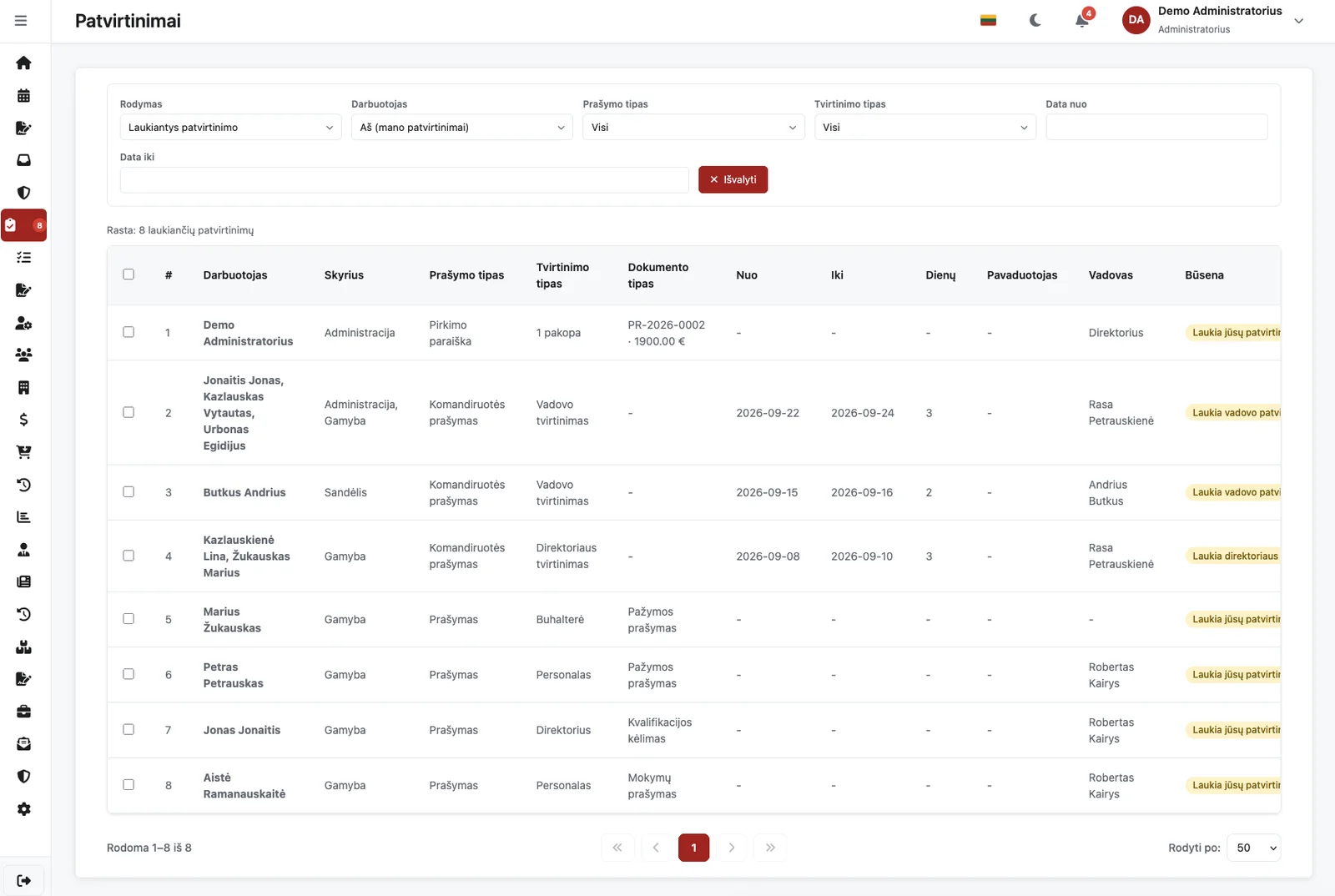
A purchase request with lines, category and supporting attachments is approved by amount limits and positions; commercial offers are collected, compared and chosen in the system, the order is sent and receipt closes the purchase. Suppliers have a register, an evaluation and an approved-supplier list.
- Request and approval by amountLines, categories, attachments; the approval chain depends on the amount and the position, investments carry a flag and justification documents by set limits.
- Collecting offers (RFQ)A request to suppliers (optionally from Outlook), offers compared in one table and the choice justified.
- Supplier register and evaluationSupplier record, qualification validity, risk group, approved-supplier list.
- Order, receipt, completionThe order is prepared and sent per the implemented process; receipt and completion states; access by department and purchasing role.
- Managers approve only what exceeds their limit – small purchases do not stall.
- The offer comparison and the decision stay in the purchase history for audit.
- Accounting sees purchase invoices next to the approved request.
PR-2026-0187
Awaiting approval| Order date | Name | Qty | Unit | Price | Delivery date | Purpose | Total |
|---|---|---|---|---|---|---|---|
| 2026-09-01 | Dell Latitude 5450 laptop | 6.000 | pcs | 1 190.00 € | 2026-09-22 | Analytics team | 7 140.00 € |
| 2026-09-01 | WD19S dock and power supply | 6.000 | pcs | 110.00 € | 2026-09-22 | Analytics team | 660.00 € |
| Total (excl. VAT): | 7 800.00 € | ||||||
| Supplier | Amount | Delivery | Payment | Selected | Actions |
|---|---|---|---|---|---|
| UAB „Baltic IT Group“ | 7 800.00 € | 2026-09-22 | 2026-10-06 | ||
| UAB „Nordtech Service“ | 7 450.00 € | 2026-10-14 | 2026-11-02 | — | |
| UAB „Vilniaus kompiuteriai“ | 8 120.00 € | 2026-09-15 | 2026-09-30 | — |
| Step | Approver | Decision | Approved by | Date | Comment |
|---|---|---|---|---|---|
| Direct manager (preliminary) | Approved | Tomas Petraitis | 2026-09-01 16:20 | Agreed, the need is justified | |
| 1 | Category owner | Approved | Rasa Kazlauskienė | 2026-09-02 09:14 | — |
| 2 | Finance director | Pending | — | — | — |
| 3 | Director | Pending | — | — | — |
Asset management
A register of short-term and fixed assets with categories, quantities and the responsible department; assets are issued to an employee, transferred, returned or written off through an approval process, and every action comes with a PDF deed the employee confirms in the system.
- Register and categoriesComputers, phones, tools, workwear – categories, quantities, partial quantities, Excel import, responsible department.
- Issue, transfer, returnAn action starts from the asset record, the employee confirms receipt, HR confirms the return; write-off with justification.
- PDF deeds and approvalThe handover deed is generated automatically, confirmed in the system and registered in the document register.
- Assets on the employee recordThe “Assets” tab on the record and “My assets” in self-service – what is issued to whom and when it is due back.
- A leaving employee's asset list in one click, no stock-take needed.
- Deeds are confirmed in the system – no printing and scanning.
- The history shows who handed each item to whom and when.
Assets assigned to me
Analytics department · D-0412Fleet management
A vehicle register with drivers, mileage, insurance and inspection; monthly trip sheets with a daily-trip generator, fuel balance and checks, accounting approval and DMS registration; fuel-card statement import, insurance incidents, reminders.
- Register and deadlinesA record with tabs, statuses, ownership or lease; reminders 30, 14, 7 and 0 days before insurance, inspection, warranty, lease and service deadlines.
- Trip sheetTrips, the generator, a fuel balance by norm or actual remainder, odometer, conflicts with absences.
- Approval and DMSSubmitted by the driver, approved by accounting, returned with a comment; PDF, Excel, DMS registration.
- Fuel and incidentsPurchases, cards, statement import with preview; insurance incidents with a claim file.
- Fuel and mileage are calculated, not retyped.
- A missing sheet is reminded automatically.
- The trip request sees whether the car is free.
Document
KL-2026-0042Fuel and mileage
| Date | Route | km | Purpose | Norm, l |
|---|---|---|---|---|
| 10-01 – 10-31 | Office – Home – Office | 504 | Work–home trip · 21 days (generated) | 29,23 |
| 10-06 | Vilnius – Kaunas – Vilnius | 212 | Client meeting | 12,30 |
| 10-13 – 10-14 | Vilnius – Klaipėda – Vilnius | 644 | Business trip · request #38 | 37,35 |
| Σ | 1 360 | 78,88 | ||
Training management
Courses with content blocks and tests are built in the system, mandatory training is assigned with deadlines and tasks, position plans assign automatically, a PDF certificate with validity is issued on completion, and seven reports show compliance.
- Courses and testsText, documents, video links, five question types; versions, publishing, categories.
- Assignments and plansEmployees, departments, positions, groups; the position plan, exemptions, periodic renewal.
- CertificatesA numbered PDF in the employee's documents, validity, reminders 60, 30 and 7 days ahead, record dates updated.
- Team and reports“Team training” for the manager, seven reports with Excel, external training.
- Mandatory training becomes a task with a deadline.
- A new position – the missing courses assign themselves.
- Compliance is visible in a matrix, not by asking around.
Active training
| Course | Version | Completed | Certificate | |
|---|---|---|---|---|
| ĮV-01 · Induction course | v2 | 2026-09-12 | — | View |
| HIG-01 · Hygiene training | v1 | 2026-06-03 | MK-2026-00017 · valid until 2027-06-03 |
Questionnaires
Manager and specialist questionnaires of 200 statements are sent from the candidate or employee record, completed through a secure link with an e-mail code, scored deterministically without AI and delivered as PDF reports for HR and the person.
- Versioned methodologyItems, scales, control pairs, a text catalogue; technical check and four-eyes approval.
- Sending and completionA link, a one-time code, a separate session, one question at a time, answers locked.
- ResultAn immutable snapshot with a hash, quality indicators, PDFs for two audiences, release to the person.
- ControlObject-level permissions, audited raw-answer access, assessor comments, disputes.
- The result can be reproduced from the same version.
- Candidate data stays in the record, not in e-mail.
- No AI in the scoring – only the approved methodology.
| Test / methodology version | Purpose | Sent | Progress | Result |
|---|---|---|---|---|
| Specialists – personality and work style · PDVS-SPEC-LT-0.1 | Recruitment / position · Sales manager | 2026-10-20 | 200 / 200 | Completed |
Employee information
Every employee has one record that holds the whole personnel file: personal and contact data, position, department and manager, contract terms, documents, assets, leave balances and action history. Data can be imported from Excel, and inactive employees stay in the archive with their full history.
- Personal and contact dataName, payroll number, date of birth, identity document, declared and actual address, work and personal contacts, emergency contact, children.
- Work information and contract termsPosition, department, direct manager and substitute, status (working, probation, dismissed), hire and probation-end dates, FTE, working hours and work location – on site, hybrid or remote.
- Everything about the employee, in tabsOverview, employment, documents, assets, leave, remote work, requests, schedules, attendance, tasks, consents and history – no searching in other modules.
- Sensitive data protectedPersonal ID, address, bank account and salary are stored encrypted and shown only to those with permission – others see “Access restricted” instead of the value.
- Data is entered once – requests, contracts, schedules and reports all use it.
- Expiring documents (health check, certificates) are colour-flagged and HR receives a daily digest.
- Employees see their own data in self-service (“My information”) and can submit a request to change it.
Basic information
Work information
Leave
Safety and health
Organisational structure
Departments, positions and reporting lines are described once – from them the system derives every employee's manager, the approval route and the substitutes. The structure is shown as a tree that can be filtered by department, zoomed and printed in A3.
- Departments and positionsA department hierarchy with groups (shifts, teams); positions reporting to a higher position; position descriptions with versions, manager and director approval and employee acknowledgement.
- The manager is derived automaticallyAn employee's manager follows from the position hierarchy; if the manager's position is vacant, the nearest occupied one above takes over. When positions or people change, managers are recalculated automatically.
- Substitution and delegationEach position lists who may substitute for it. When a manager's leave is approved, approval rights pass to the substitute temporarily – automatically, for the stated period.
- The structure treeEmployee search, department filter, expand and collapse, zoom, a card with contacts and hire date. The “AI organisation tree” suggests reporting links that an administrator reviews and saves.
- Approvals follow positions, not surnames – when people change, processes need no rewriting.
- When a manager goes on leave, requests do not stall – the substitute approves them.
- New employees and managers see the structure immediately and know whom to contact.
-
JKJonas KazlauskasDirectorAdministrationDirector
- RKRasa KazlauskienėHead of HRAdministrationManager
- AKAistė KairytėHR specialistEmployee
- TPTomas PetraitisHead of financeFinanceManagerSubstitute: Rasa Kazlauskienė
- EVEglė VaitkutėSenior analystEmployee
- KŠKarolis ŠimkusAnalystEmployee
- DMDarius MockusHead of productionProductionManager
- MJMantas JankauskasProject managerEmployee
- RBRūta ButkienėOperatorEmployee
- +6+6 employeesProduction
Leave requests
The employee picks the leave type, enters the dates and the substitute – the system counts the days, shows the balance after the leave and sends the request for approval. Once approved, the balance is updated, the days are written into the schedule and the absence is passed to payroll.
- Leave types by company rulesAnnual, unpaid, parent days, paternity and childcare leave, free time – for each type HR sets whether the balance is deducted, whether a substitute is required, whether a day can be split, the quarterly limit and whether an attachment is needed.
- A form that does the countingStart and end date, substitute, holiday-pay timing (before the leave or with the salary), reason and attachments. The sidebar shows working and calendar days, the balance after the leave and the manager who will approve.
- The approval sequenceFirst the substitute confirms, then the manager approves, rejects or returns the request with a comment the employee can reply to. Requests still unapproved by their start date are cancelled automatically.
- What happens on approvalThe balance is deducted, the substitution is activated, the document is registered, the days go into the work schedule, the absence is passed to Vikarina and a signed PDF is generated. On cancellation the balance is restored.
- No e-mails and no spreadsheets – the status is visible to the employee, the manager and HR.
- Balances are always right: they change only when leave is approved, cancelled or shortened.
- An annual leave schedule with Excel import and export and PDF; paper requests are entered by HR as already approved.
Leave request
Day count
5 d.| Working days | 5 |
| Calendar days | 7 |
| Balance after: | 9 d. |
| Annual balance Updated 2026-09-01 | 14 d. |
| Seniority balance | 3 d. |
Employee
Approval sequence
- Substitute confirms NowKarolis Šimkus
- Manager approvesTomas Petraitis
- Balance, schedule, Vikarinaupdated automatically
Other requests
Remote work, business trip, certificate, overtime, training, advance, equipment, personal-data change – every request has its own form and approval route. HR switches on the standard requests or builds its own templates with fields and a DOCX document – no programming.
- Standard requestsSchedule change, overtime, training, leave cancellation, personal-data change, contract termination, tax allowance, birth notification, certificate, advance, tools and equipment, employee ID – HR switches each one on or off.
- Your own templates in four stepsName and description; form fields (text, date, number, choice, checkbox – reordered by dragging); a DOCX template with {{fields}} from which a PDF is generated; visibility by department, position or employee.
- An approval route per typeManager only, HR only, manager and director, manager and HR, or HR and manager. A business trip is approved by the manager and the director, remote work by the manager – and it goes straight into the schedule.
- One approval centreEvery decision – requests, documents, purchases, assets – in one queue for the manager: approve, reject or return for correction. The employee sees the status and the action history; accounting marks what has been entered into other systems.
- Some requests do the work themselves: overtime goes into the schedule, a data change updates the record, a child is added to the file.
- Certificates, advances and tax allowance no longer travel by e-mail – they have a status, an owner and a history.
- A new request type is an HR job, not an IT ticket.
New request
Choose the document type| Name | Approval | |
|---|---|---|
| Salary certificate | HR only | Fill in |
| Training request | Manager + HR | Fill in |
| Additional equipment request | Manager + HR | Fill in |
| Name | Approval | |
|---|---|---|
| Schedule change | Manager + HR | Fill in |
| Overtime | Manager only | Fill in |
| Tax allowance (NPD) | HR only | Fill in |
| Advance | Manager + HR | Fill in |
| Personal-data change | HR only | Fill in |
| Business-trip request | Manager + Director | Fill in |
Employment contracts and amendments
A contract is prepared from the company template with variables, numbered automatically (e.g. DS-2026-0012), passes approval and is signed with the internal e-signature or by uploading the signed file. The terms are copied to the employee record and amendments take effect on their date.
- Contract, amendment, terminationContract kinds under Labour Code art. 66, start, end, probation, position, workplace, pay (fixed, hourly, piece-rate), FTE. An amendment shows what changes, before and after; a termination records the grounds, notice, compensation and final settlement.
- Templates with variablesText from the company template (HTML or Word) or the system template; variables such as contract number, employee, salary in words and the probation clause. After the first signature the PDF is locked and its checksum stored.
- Approval and signingDraft → list of approvers → employee signature → manager signature → in force. Signing with the internal e-signature (password, time, IP, browser) or by uploading a signed PDF, ADoc or ASiC-E; a qualified e-signature service (Dokobit) connection is in development.
- Onboarding documentsWork rules, confidentiality undertaking and other mandatory documents are signed in the system with time, IP and browser evidence; until every one is signed the employee is not let into the system.
- Contract terms are no longer retyped – they are copied to the record and amendments apply automatically on their effective date.
- The signed document is registered and a copy is e-mailed to the employee.
- A reminder goes out before a fixed-term contract expires.
Main details
| # | Approver | Role | Status | Date |
|---|---|---|---|---|
| 1 | Rasa Kazlauskienė | hr_lead | Approved | 2026-09-02 |
| 2 | Tomas Petraitis | manager | Approved | 2026-09-03 |
| 3 | Karolis Šimkus | director | Approved | 2026-09-04 |
| Role | Signer | Status | Date | File |
|---|---|---|---|---|
| Employee | Eglė Vaitkutė | Awaiting signature | — | — |
| Manager | Karolis Šimkus | Awaiting signature | — | — |
| Time | User | Action |
|---|---|---|
| 2026-09-04 14:22 | Karolis Šimkus | Approved · sent for signing |
| 2026-09-03 10:41 | Tomas Petraitis | Approved in the approval sequence |
| 2026-09-02 09:15 | Rasa Kazlauskienė | Submitted for approval · PDF generated |
Work schedule and timesheet
The schedule is built from shift codes and repeating cycles (e.g. 3+3), approved in versions and becomes the timesheet, approved by the manager, HR and the director. Approved leave, remote work, overtime and sick leave are written into it automatically.
- Shift codes and cyclesEach code has times, lunch break, hours, a monthly limit and a Vikarina code. The schedule is filled by codes or by the cycle assigned to the employee; a right-click marks overtime or a shortened day.
- Versions, groups and approvalSchedule versions (V1, V2…), personal schedule groups, filters by department, year, month and version, normal or timesheet view. The timesheet is approved manager → HR → director and then imported into Vikarina.
- Actual attendancePast days show “on time”, “late”, “left early” and “absent” marks from BioStar 2 door events or Worksober sobriety tests; a “compare with actual” PDF for managers. Sick-leave certificates are imported from XML.
- The employee sees their scheduleThe department schedule in self-service, the weekly schedule and clock-in / clock-out at the shop-floor kiosk, schedule and attendance tabs on the employee record. Public holidays are managed centrally.
- One schedule for everyone: the same source for the manager, HR, accounting and the employee.
- The timesheet is not entered twice – the approved schedule goes straight to payroll.
- Absences and late arrivals are visible at once, not at month end.
| Employee | DAY HOURS | NIGHT HOURS | TOTAL | 1 | 2 | 3 | 4 | 5 | 6 | 7 | 8 | 9 | 10 | 11 | 12 | 13 | 14 | 15 | 16 | 17 | 18 | 19 | 20 | 21 | 22 | 23 | 24 | 25 | 26 | 27 | 28 | 29 | 30 |
|---|---|---|---|---|---|---|---|---|---|---|---|---|---|---|---|---|---|---|---|---|---|---|---|---|---|---|---|---|---|---|---|---|---|
| An | Tr | Kt | Pn | Št | Sk | Pr | An | Tr | Kt | Pn | Št | Sk | Pr | An | Tr | Kt | Pn | Št | Sk | Pr | An | Tr | Kt | Pn | Št | Sk | Pr | An | Tr | ||||
| Jonas Petraitis | 136 | 0 | 136 | D | NP | NP | NP | P | P | NP | NP | D | D | D | P | P | D | D | D | D | D | P | P | D | D | D | D | D | P | P | D | D | D |
| Rūta Butkienė | 0 | 176 | 176 | N | N | N | N | P | P | N | N | N | N | N | P | P | N | N | N | N | N | P | P | N | N | N | N | N | P | P | N | N | N |
| Karolis Šimkus | 104 | 0 | 104 | A | A | A | A | P | P | A | A | A | A | A | P | P | D | D | D | D | D | P | P | D | D | D | D | D | P | P | D | D | D |
| Eglė Vaitkutė | 176 | 0 | 176 | D | ND | D | ND | P | P | D | D | ND | D | ND | P | P | D | D | ND | D | ND | P | P | D | D | ND | D | ND | P | P | D | D | ND |
| Tomas Petraitis | 152 | 0 | 152 | D | D | D | D | P | P | D | D | D | D | D | P | P | D | D | D | D | D | P | P | K | K | K | D | D | P | P | D | D | D |
| Mantas Jankauskas | 180 | 0 | 180 | D | D | D | D | P | P | D | D | VD | D | D | P | P | D | D | VD | D | D | P | P | D | D | D | D | D | P | P | D | D | D |
Schedule information
| Code | Hours | Time | Lunch break | Note |
|---|---|---|---|---|
| D | 8 h | 08:00 – 17:00 | 12:00 – 13:00 | Standard day shift |
| N | 8 h | 22:00 – 06:00 | 02:00 – 02:30 | Night shift |
| ND | 8 h | 08:00 – 17:00 | 12:00 – 13:00 | Remote work |
| VD | 10 h | 08:00 – 19:00 | 12:00 – 13:00 | Overtime |
| P | — | — | — | Rest day |
| A | — | — | — | Annual leave |
| NP | — | — | — | Sick leave |
| K | — | — | — | Business trip |
Business trips
A four-step request to travel, per diems by country and date for every traveller, approval manager → director, an automatic order with DMS registration and a “K” mark in the schedule, advances for accounting, expenses with receipts and the expense report.
- Request and per diemsRoute lines with countries, the organiser-paid share, short days at 20 %, a multi-employee request for the manager.
- Approval and orderManager, director, consent to travel when required; order, DMS, schedule and payroll – automatically.
- PaymentsAdvance and per diems in “Finance → Payments” with a “Pay by” deadline, the employee's account and a tax-threshold warning.
- Expenses and expense reportAI receipt reading, ECB rates, manager approval, closing by accounting, a PDF with receipts into the DMS.
- The system applies the per-diem rules, not the employee.
- No order to write – it appears on approval.
- Receipts and the expense report in one file with checksums.
Request information
Awaiting the director| Place | Period | Employees | Rate €/day | Per diems |
|---|---|---|---|---|
| Riga Expo · Riga, Latvia | 11-09 – 11-11 | 2 | 44,00 | 264,00 € |
Approval progress
Not working on those days
Documents
Messages
Internal messaging where the requests already are: one conversation per pair, broadcasts to everyone or to subordinates with read statistics, photo and PDF attachments, an unread badge on every page.
- ConversationsAn employee writes to the manager and HR, a manager and HR write to any active employee.
- BroadcastsA separate thread for every recipient, “read X of Y”, private replies.
- AttachmentsPhotos and PDF up to 10 MB, up to 5 files per message, pasting from the clipboard.
- PrivacyOnly participants see a thread and its attachments; another person's thread returns 404 even to the administrator.
- Reaches employees without e-mail.
- You see who has read the broadcast.
- No separate address books – the structure comes from PDVS.
AI assistant
An in-system chat from the company knowledge base with live settings; when asked it tells the user their own balance, schedule and request statuses, drafts a training course, reads CVs and receipts. The provider is Azure OpenAI, OpenAI or a local company model.
- Knowledge baseThirty topics on requests, approvals, training, business trips – with company values and menu paths based on permissions.
- Own dataBalance, schedule, requests – only when asked and only the user's own; no data about other employees.
- Documents and draftsCVs, receipts, an RFQ e-mail, a training course draft by a strict schema.
- GovernanceProvider, limits, budget, retention period, token report, connection test.
- Answers from your rules, not from the internet.
- The model can run on your own server.
- Cost and limits are visible in a report.
Why PDVS
because in a large organisation traceability matters most.
Who approved, which document version is in force and who has acknowledged it – questions a large company has to answer quickly. MAXI joins them to all people and purchasing processes.
- Document code, versions and approval audit
- Acknowledgement campaigns with a visible status
- Permissions by folder, department, position and role
- Audit log and sign-in history for every module
- One version in force – no “FINAL_new.docx”
- Review comments straight in the PDF copy
- A register filtered by company